Keyword research is the foundation of every successful SEO and paid search strategy, and few tools make it as accessible as Google Keyword Planner. It is free, it pulls data straight from Google, and it helps you discover the exact terms your audience is searching for. This guide walks you through what Google Keyword Planner is and how to use it to find the right keywords and improve your rankings.
What Is Google Keyword Planner?
Google Keyword Planner is a free keyword research tool built into Google Ads. An AdWords optimization expert uses it to pinpoint the keywords worth bidding on. It was designed to help advertisers plan pay per click campaigns, but it is just as valuable for SEO. You can use it to discover new keyword ideas, see how often people search for a term, understand how competitive it is, and estimate what advertisers pay for it. Because the data comes directly from Google, it is one of the most trusted starting points for any keyword strategy.
How to Access Google Keyword Planner
To use Keyword Planner, you need a free Google Ads account. Creating one does not require you to run any ads. Once you are signed in, open the Tools section and select Keyword Planner. From there, you are ready to start researching. Keeping an account active simply gives you ongoing access to the tool and its data.
The Two Main Tools in Keyword Planner
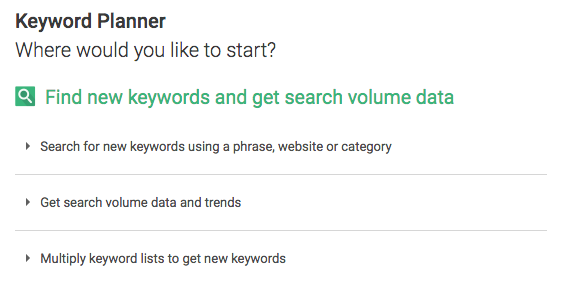
When you open Keyword Planner, you are given two core options.
1) Discover New Keywords
This is the ideal starting point for finding fresh keyword ideas. You can enter a few seed keywords that describe your product or service, or you can enter a website or landing page URL and let Google suggest related terms. For the best results, avoid broad industry terms and instead use a small set of specific, focused keywords. Google then returns a large list of related keyword ideas along with useful data for each one.
2) Get Search Volume and Forecasts
If you already have a list of keywords, this option lets you paste them in to see their search volume and performance trends. It shows historical data and forecasts, helping you understand demand and prioritize the terms worth targeting. It is perfect for validating a keyword list you built from other sources.
How to Set Up Your Search
Before you rely on the numbers, make sure your settings match your audience.
Location and Language
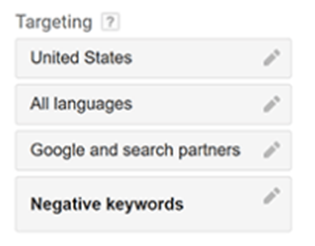
Set your target location to a specific country, region, or city so the search volume reflects the audience you actually serve. Choose the language your customers use as well. These settings ensure the data is relevant to your market rather than a global average that may mislead you.
Filters and Keyword Options
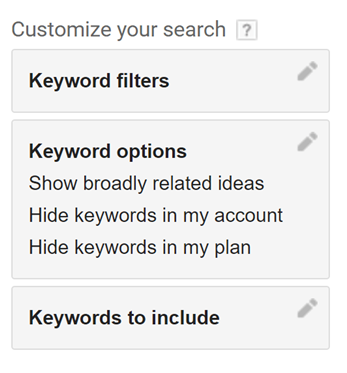
Use filters to refine your results by monthly search volume, competition, suggested bid, and more. You can include specific words you always want to see, or add negative keywords to remove terms that are not relevant. Filtering keeps your list focused on keywords that fit your goals and audience.
Understanding the Keyword Metrics
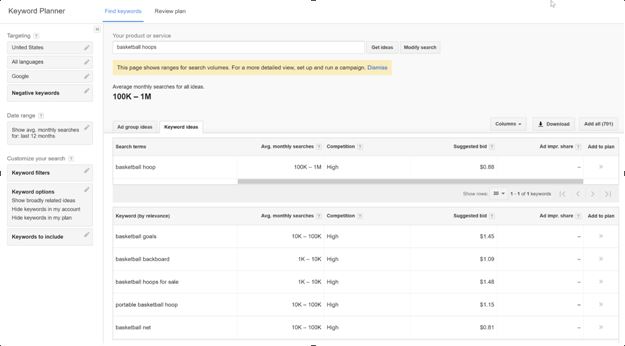
The real value of Keyword Planner is in the data it provides for each keyword.
Average Monthly Searches
This shows roughly how many times a keyword is searched each month. It helps you gauge demand, though it is usually given as a range, so treat it as a guide rather than an exact figure.
Competition
Competition indicates how many advertisers are bidding on a keyword. While this reflects paid competition rather than organic difficulty, it still hints at how commercially valuable a term is.
Top of Page Bid
This estimates what advertisers pay for a click on that keyword. A higher bid often signals strong buyer intent, which can make a keyword worth targeting even if its search volume is modest.
How to Use Keyword Planner for SEO
Although the tool was built for advertisers, it is excellent for SEO. Start with broad seed keywords to uncover ideas, then look for terms with solid search volume and clear intent. Prioritize longer, more specific phrases, since they are often easier to rank for and attract highly targeted visitors. Group related keywords into topics, and build content around the questions and needs behind them. You can also use the bid data to spot commercially valuable keywords worth targeting for both SEO and your pay per click campaigns.
Frequently Asked Questions
Is Google Keyword Planner free?
Yes. Google Keyword Planner is completely free to use. You only need a Google Ads account, and you are not required to run any ads to access it.
Can I use Keyword Planner for SEO and not just ads?
Absolutely. Many marketers rely on it for SEO keyword research because the data comes straight from Google and reveals real search demand.
Why does search volume show a range?
Accounts with little or no ad spend often see broad ranges instead of exact numbers. Running active campaigns can unlock more precise data, but the ranges are still useful for planning.
Conclusion
Google Keyword Planner is a powerful and free way to research keywords, understand search demand, and build a smarter content and advertising strategy. With the right settings and a focus on relevant, high intent terms, it gives you the insights you need to target the keywords that matter most.
If you want experts to handle your keyword research and turn it into real rankings, Optmistic Technologies offers complete search engine optimization services built around proven strategy. Request a free quote and start attracting the right audience today.