Core Web Vitals are three metrics Google uses to measure how fast, responsive, and stable your pages feel to real visitors. They aren’t lab scores or vanity numbers. They come from real people using Chrome on your site, and they feed into how Google ranks you. This guide explains what each metric means in 2026, the thresholds you need to hit, how to measure your own scores, and exactly how to improve each one.
What Are Core Web Vitals?
Core Web Vitals are part of Google’s page experience signals. They boil the messy idea of “does this page feel good to use” down to three measurable things: how quickly the main content loads, how fast the page responds when someone interacts with it, and how much the layout jumps around while it loads. Get all three into the good range and the page feels smooth. Miss them and visitors feel the lag, even if they can’t name it.
The Three Core Web Vitals Explained
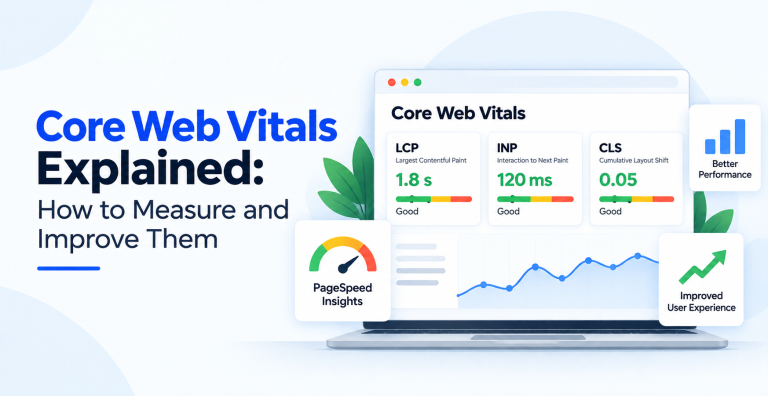
Here are the three metrics and the score you need for each.
| Metric | What it measures | Good score |
|---|---|---|
| LCP (Largest Contentful Paint) | Loading speed of the main content | Under 2.5 seconds |
| INP (Interaction to Next Paint) | Responsiveness to clicks and taps | Under 200 milliseconds |
| CLS (Cumulative Layout Shift) | Visual stability while loading | Under 0.1 |
Largest Contentful Paint (LCP)
LCP marks the moment the biggest visible element finishes loading, usually a hero image, a banner, or a large block of text. It’s the closest single number to “how long until this page looks ready.” A slow LCP is almost always caused by a heavy image, a slow server response, or scripts blocking the page from rendering.
Interaction to Next Paint (INP)
INP replaced First Input Delay in 2024 and is stricter. It measures how quickly the page visibly responds when someone taps or clicks, across the whole visit, not just the first interaction. If a button feels laggy after a tap, that’s poor INP, and it’s usually caused by heavy JavaScript tying up the browser.
Cumulative Layout Shift (CLS)
CLS measures how much the page moves around as it loads. You’ve felt bad CLS when you go to tap a link and an image loads above it, pushing everything down so you tap the wrong thing. It’s annoying and it’s measurable, and it usually comes from images without set dimensions or content injected late.
How Google Measures Core Web Vitals
This part trips people up. Google grades you on real visitor data, not a lab test. It uses the Chrome User Experience Report, which collects scores from actual Chrome users, and it judges you at the 75th percentile over a rolling 28 day window. In plain terms, at least 75 percent of your visitors need a good score on a page for that page to pass. A perfect score in a testing tool means little if real users on real devices are having a slower experience.
How to Measure Your Own Scores
Use two kinds of tool together. Field data shows what real users get. Lab data helps you debug.
- Google Search Console. The Core Web Vitals report under Experience shows which pages pass or fail, grouped by issue, using real user data. Start here.
- PageSpeed Insights. Enter a URL and it shows both the field data and a lab test, plus specific suggestions for that page.
- Chrome DevTools and Lighthouse. For hands on debugging while you build and fix.
Check field data first to see where you actually stand, then use lab tools to find the cause.
How to Improve LCP
Find the largest element above the fold, then make it appear faster. Compress and correctly size the hero image, and serve it in a modern format. Speed up your server response, and use good caching or a CDN. Remove render blocking scripts and CSS so the browser can paint sooner. Preload the main image or font if it’s the thing holding you back. On heavy sites, serving pre rendered HTML rather than a blank page that waits for JavaScript makes a big difference.
How to Improve INP
INP is a JavaScript problem more often than not. Break long running tasks into smaller pieces so the browser can respond between them. Defer or remove scripts that aren’t needed for the first interaction. Cut third party scripts you don’t really use, since each one competes for the main thread. Keep the page’s structure lean, because a huge, complex DOM slows every interaction. This is where a developer’s help usually pays off.
How to Improve CLS
Stop things from moving. Always set width and height on images and video so the browser reserves the space before they load. Give ads, embeds, and iframes a reserved slot. Load web fonts in a way that doesn’t cause a jarring swap. Add new content below what the user is reading, not above it. These are small fixes, and they usually clear CLS quickly.
Do Core Web Vitals Affect Rankings?
Yes, but with nuance. Core Web Vitals are a ranking signal, not the ranking factor. Relevance and content quality still come first. Where they matter most is as a tie breaker: when two pages are similar in quality, the faster, smoother one tends to win, and a genuinely poor experience can hold a good page back. They also affect conversions directly, since faster pages keep more visitors. Fixing them is part of solid technical SEO and it pays off twice, in rankings and in sales.
Quick Wins on WordPress and Most CMS Platforms
If you’re on WordPress or a similar platform, a handful of changes clear most Core Web Vitals problems without touching code. Install a good caching plugin and a proper image optimization plugin that serves WebP and lazy loads below the fold. Cut plugins you don’t use, since each one adds weight. Choose a lightweight, well coded theme. Put a CDN in front of the site. Make sure every image has width and height set so nothing shifts. These alone fix the majority of small business sites.
How Long Do Fixes Take to Show?
This catches people out. Because Google grades on a rolling 28 day window of real visitor data, a fix you ship today will not move your score today. Lab tools like PageSpeed Insights update instantly, so use them to confirm the fix worked. The field data in Search Console then catches up gradually, usually taking around four weeks to fully reflect the change as new visitor data replaces the old. Don’t panic if the score sits still for a week or two. That’s normal.
Common Core Web Vitals Mistakes
- Chasing a 100 in Lighthouse. Lab scores are for debugging. Google ranks on real user field data, which is often different.
- Fixing the homepage only. Scores are measured per URL. Your key landing and product pages matter just as much.
- Ignoring mobile. Most visits are on phones, and mobile scores are usually the weaker ones.
- Adding plugins to fix plugins. Piling on performance plugins can slow a site further. Fix the cause instead.
- Expecting instant results. Give the 28 day field data time to update before judging a fix.
Frequently Asked Questions
What are the three Core Web Vitals?
They are Largest Contentful Paint (LCP) for loading speed, Interaction to Next Paint (INP) for responsiveness, and Cumulative Layout Shift (CLS) for visual stability. Good scores are LCP under 2.5 seconds, INP under 200 milliseconds, and CLS under 0.1.
What replaced First Input Delay?
Interaction to Next Paint (INP) replaced First Input Delay as a Core Web Vital in 2024. INP is stricter because it measures responsiveness across the whole visit, not just the first interaction, so it reflects how the page actually feels to use.
How does Google measure Core Web Vitals?
Google uses real visitor data from the Chrome User Experience Report, graded at the 75th percentile over a rolling 28 day window. A page passes when at least 75 percent of real visitors get a good score, so lab tests alone don’t decide it.
Do Core Web Vitals affect SEO rankings?
Yes, they are a ranking signal, but relevance and content quality matter more. Core Web Vitals act mainly as a tie breaker between similar pages, and a poor experience can hold a good page back. They also improve conversions by keeping visitors on the page.
What is a good LCP score?
A good LCP is under 2.5 seconds. Between 2.5 and 4 seconds needs improvement, and over 4 seconds is poor. Improve it by compressing the largest above the fold element, speeding up server response, and removing render blocking scripts.
Which tool should I use to check Core Web Vitals?
Start with the Core Web Vitals report in Google Search Console for real user data, then use PageSpeed Insights to debug a specific page. Chrome DevTools and Lighthouse help while you build and fix.
Core Web Vitals reward the same thing users want: a page that loads fast, responds instantly, and holds still. Measure your scores with real user data, fix the biggest offenders first, and recheck. If you’d rather have specialists handle the technical side, our technical SEO services team improves site speed and Core Web Vitals as part of a full audit.